Field of Science

Web Experiment Tutorial: Chapter 7, MySQL

Several years ago, I wrote a tutorial for my previous lab on how to create Web-based experiments in Flash. I am currently posting that tutorial chapter by chapter.


MySQL is a very popular and free database program. We will use it to store your data.

1. What is MySQL?

The pertinent question is: What is a database? An in depth discussion of databases is beyond the scope of this manual. For our purposes, you can think of a database as an extremely complicated collection of spreadsheets. It is in fact much, much more – especially since MySQL in fact implements relational databases. However, we aren’t going to use any of that functionality.

Each data base contains tables. For our purposes, you can think of each table as a spreadsheet. In fact, you can link the data between tables in a database, but you are unlikely to need this capability.

Each table contains rows and columns, just like a spreadsheet. For all intents and purposes, you can have as many as you want. The columns are named. Rows are not.

2. Opening MySQL.

If you have a web interface for your MySQL server, the section below won't be relevant. The web interface is sufficiently simple that I won't describe it here. 

Open a terminal. Use SSH to log onto your web server. Here’s what it looks like for me:

Last login: Tue Jun  5 13:48:36 on ttyp2
Welcome to Darwin!
dhcp-0000059136-59-ff:~ josh$ ssh vcognit@research.wjh.harvard.edu
Password:
Last login: Tue Jun  5 13:48:17 2007 from dhcp-0000059136
Sun Microsystems Inc.   SunOS 5.9       Generic May 2002
research ~>

Now, I change directories to the MySQL bin folder. If MySQL is in your path, this won’t be necessary. Open MySQL as follows:

research /opt/csw/mysql4/bin> ./mysql -u USERNAME -p DATABASENAME
Enter password:

You will need to type in your username and database name as appropriate. Your database name should have been given to you by your database administrator. If you are your database administrator, you are going to have to figure this out for yourself.

Once you’ve logged on, you will see the following prompt:

Reading table information for completion of table and column names
You can turn off this feature to get a quicker startup with -A

Welcome to the MySQL monitor.  Commands end with ; or \g.
Your MySQL connection id is 39203 to server version: 4.1.9-log

Type 'help;' or '\h' for help. Type '\c' to clear the buffer.

mysql>

3. Creating a table.

Although I now have a web interface for MySQL, I continue to use SQL script to create and modify tables, though there are ways of doing some of this through the web interface. Again, if you can do it the way described below, you should have little difficulty with the web interface. 

Now, we are going to create a table to hold the data from our experiment. Type in the following:

mysql> CREATE TABLE VSTM (
    -> subject_age INT(3),
    -> subject_sex VARCHAR(6),
    -> subject_vision VARCHAR(3),
    -> initials VARCHAR(5),
    -> trial INT(3),
    -> correct INT(1),
    -> stimulus INT(2),
    -> match INT(1),
    -> probe INT(1),
    -> date DATE,
    -> time TIME,
    -> ip VARCHAR(25)
    -> );

If you are using a web interface, you won't need the "->" codes. That is something that appears automatically in the terminal to mark that the new line is part of the same command.

The first line names the table “VSTM”. The following lines create columns. Note that the names of each column must be EXACTLY the same as the names of the variables in scriptVars. Otherwise, MySQL can’t figure out which data belongs to which column and nothing will get written. If MySQL isn’t recording your data, 95% of the time this is because you have a type-o or mismatch in your column and variable names. “date”, “time” and “ip” all come from the PHP file. Again, the names must match.

INT and VARCHAR are data types. INT means the column contains integers. VARCHAR means in contains letters and/or numbers. The number in parentheses is the size of the column. “match” is always a 0 or a 1, so it only requires a column 1 character wide. “subject_sex” is either 4 letters (“male”) or 6 letters (“female”), so the column size is set to 6. You can always have bigger columns than are necessary. DATE and TIME are also data types with rather obvious properties.

Unfortunately this code won’t work. You’ll get the following response:

ERROR 1064 (42000): You have an error in your SQL syntax; check the manual that corresponds to your MySQL server version for the right syntax to use near 'match INT(1),
probe INT(1),
date DATE,
time TIME,
ip VARCHAR(25)
)' at line 9

MySQL error messages aren’t very useful. By trial and error, you would figure out that the problem is the name “match”. “Match” is a restricted name in MySQL, and you can’t give that name to a column. So we are going to have to change that name here AND in the Flash file. Change both to “matches”. This has been done in Part6.fla.

Try again:

mysql> CREATE TABLE VSTM (
    -> subject_age INT(3),
    -> subject_sex VARCHAR(10),
    -> subject_vision VARCHAR(3),
    -> initials VARCHAR(5),
    -> trial INT(3),
    -> correct INT(1),
    -> stimulus INT(2),
    -> matches INT(1),
    -> probe INT(1),
    -> date DATE,
    -> time TIME,
    -> ip VARCHAR(25)
    -> );
Query OK, 0 rows affected (0.01 sec)

This time, MySQL says that the table has been successfully created.

4. Deleting a table.

If you want to remove a table, use the drop command:

mysql> DROP TABLE VSTM;

5. Try it out.

Make sure that submit_vars.php is at the URL cited in your Flash file. Run your experiment once through. If you have done everything correctly, data will be recorded in your MySQL database. Now, how do you get to it? 

If you run into trouble, use the Flash file Part6.fla. If there are still problems, then there are probably problems with your table or your PHP file. In the PHP file, make sure that the username, password, host name, database name and table name are all correct. In MySQL, make sure you have the right number of columns – 12 – and that they are all named the right thing. You can double check this with the following command:

mysql> describe VSTM;
+----------------+-------------+------+-----+---------+-------+
| Field          | Type        | Null | Key | Default | Extra |
+----------------+-------------+------+-----+---------+-------+
| subject_age    | int(3)      | YES  |     | NULL    |       |
| subject_sex    | varchar(10) | YES  |     | NULL    |       |
| subject_vision | char(3)     | YES  |     | NULL    |       |
| initials       | varchar(5)  | YES  |     | NULL    |       |
| trial          | int(3)      | YES  |     | NULL    |       |
| correct        | int(1)      | YES  |     | NULL    |       |
| stimulus       | int(2)      | YES  |     | NULL    |       |
| matches        | int(1)      | YES  |     | NULL    |       |
| probe          | int(1)      | YES  |     | NULL    |       |
| date           | date        | YES  |     | NULL    |       |
| time           | time        | YES  |     | NULL    |       |
| ip             | varchar(25) | YES  |     | NULL    |       |
+----------------+-------------+------+-----+---------+-------+
12 rows in set (0.00 sec)

mysql>

If yours looks different, fix it. You can either use the DROP command to remove the table and start over, or you can modify the columns directly. Here is an example:

mysql> alter table VSTM drop column ip;
Query OK, 6 rows affected (0.01 sec)
Records: 6  Duplicates: 0  Warnings: 0

mysql> alter table VSTM add column ip VARCHAR(25);
Query OK, 6 rows affected (0.02 sec)
Records: 6  Duplicates: 0  Warnings: 0

There are also commands to simply rename a column, etc. Google “MySQL alter table” and you should be able to find good explanations of your options.

6. Viewing your data.

You have now run your experiment at least once. Hopefully MySQL now contains data. How do you see it?

mysql> select * from VSTM;
+-------------+-------------+----------------+----------+-------+---------+----------+---------+-------+------------+----------+------+
| subject_age | subject_sex | subject_vision | initials | trial | correct | stimulus | matches | probe | date       | time     | ip   |
+-------------+-------------+----------------+----------+-------+---------+----------+---------+-------+------------+----------+------+
|           2 | male        | no             | jkh      |     0 |       1 |        3 |       1 |     3 | 2007-06-05 | 14:57:06 | NULL |
|           2 | male        | no             | jkh      |     1 |       1 |        2 |       0 |     3 | 2007-06-05 | 14:57:22 | NULL |
|           2 | male        | no             | jkh      |     2 |       1 |        3 |       1 |     3 | 2007-06-05 | 14:57:25 | NULL |
|           2 | male        | no             | jkh      |     3 |       1 |        1 |       0 |     2 | 2007-06-05 | 14:57:27 | NULL |
|           2 | male        | no             | jkh      |     4 |       1 |        1 |       0 |     2 | 2007-06-05 | 14:57:30 | NULL |
|           2 | male        | no             | jkh      |     5 |       1 |        3 |       1 |     3 | 2007-06-05 | 14:57:33 | NULL |
+-------------+-------------+----------------+----------+-------+---------+----------+---------+-------+------------+----------+------+
6 rows in set (0.00 sec)


Everything looks good. The IP address is NULL because you ran it off of your desktop. When you run it from the Web, this should change.

Notice that if several people ran this experiment, you would have to use a combination of initials age and sex to tell them apart. If the same person did the experiment more than once, there would be no easy way to code for that. What we want is a subject number.

7. Creating a subject number.

Add the following code to the Intialize frame:

var getID = new LoadVars();
getID.onLoad = function(success) {
          id = this.id;
};
getID.load("http://URL/get_next_id.php");

Open get_next_id.php:


$db = mysql_connect ('HOST', 'USERNAME', 'PASSWORD');
mysql_select_db ('DATABASE');

$query1 = "INSERT INTO VSTM_id_incrementor VALUES (NULL);";
mysql_query($query1);

$id = mysql_insert_id ($db);

mysql_close();

echo "&id=" . $id;

?>

Again, change the first two lines to match your host name, username, password and database name. Notice that this file inserts a blank row into the table VSTM_id_incrementor. We need to create this table:

mysql> CREATE TABLE VSTM_id_incrementor ( id INT NOT NULL AUTO_INCREMENT PRIMARY KEY);
Query OK, 0 rows affected (0.01 sec)

This creates the table VSTM_id_incrementor with a single column – id – that automatically increments. That is, each time a row is added, the value of that column in that row will be one greater than in the previous row. Try this:

mysql> select * from VSTM_id_incrementor;
Empty set (0.00 sec)

mysql> insert into VSTM_id_incrementor VALUES ('NULL');
Query OK, 1 row affected, 1 warning (0.00 sec)

mysql> select * from VSTM_id_incrementor;
+----+
| id |
+----+
|  1 |
+----+
1 row in set (0.00 sec)

mysql> insert into VSTM_id_incrementor VALUES ('NULL');
Query OK, 1 row affected, 1 warning (0.00 sec)

mysql> insert into VSTM_id_incrementor VALUES ('NULL');
Query OK, 1 row affected, 1 warning (0.00 sec)

mysql> select * from VSTM_id_incrementor;
+----+
| id |
+----+
|  1 |
|  2 |
|  3 |
+----+
3 rows in set (0.00 sec)

8. Recording the subject number.

Now, each time the Flash file runs, it will insert a blank row into VSTM_id_incrementor and retrieve the new subject id. Now we need to record that when data is recorded. There is only one small change to the Flash file.

Add:

scriptVars.subject_id = id;

to prepareResults. You can see this in Part7.fla.

You need to also add a column called “subject_id” to the table VSTM:

mysql> alter table VSTM add column subject_id INT(4);
Query OK, 6 rows affected (0.01 sec)
Records: 6  Duplicates: 0  Warnings: 0

Make sure that the get_next_id.php file in your website has been updated. Now, run your experiment again.

Afterwards, you should be able to see something like this:

select * from VSTM;
+-------------+-------------+----------------+----------+-------+---------+----------+---------+-------+------------+----------+---------------+------------+
| subject_age | subject_sex | subject_vision | initials | trial | correct | stimulus | matches | probe | date       | time     | ip            | subject_id |
+-------------+-------------+----------------+----------+-------+---------+----------+---------+-------+------------+----------+---------------+------------+
|           2 | male        | no             | jkh      |     0 |       1 |        3 |       1 |     3 | 2007-06-05 | 14:57:06 | NULL          |       NULL |
|           2 | male        | no             | jkh      |     1 |       1 |        2 |       0 |     3 | 2007-06-05 | 14:57:22 | NULL          |       NULL |
|           2 | male        | no             | jkh      |     2 |       1 |        3 |       1 |     3 | 2007-06-05 | 14:57:25 | NULL          |       NULL |
|           2 | male        | no             | jkh      |     3 |       1 |        1 |       0 |     2 | 2007-06-05 | 14:57:27 | NULL          |       NULL |
|           2 | male        | no             | jkh      |     4 |       1 |        1 |       0 |     2 | 2007-06-05 | 14:57:30 | NULL          |       NULL |
|           2 | male        | no             | jkh      |     5 |       1 |        3 |       1 |     3 | 2007-06-05 | 14:57:33 | NULL          |       NULL |
|          26 | male        | yes            | jkh      |     0 |       1 |        3 |       0 |     1 | 2007-06-05 | 16:01:26 | 140.247.95.39 |          4 |
|          26 | male        | yes            | jkh      |     1 |       1 |        2 |       1 |     2 | 2007-06-05 | 16:01:28 | 140.247.95.39 |          4 |
|          26 | male        | yes            | jkh      |     2 |       1 |        2 |       0 |     3 | 2007-06-05 | 16:01:32 | 140.247.95.39 |          4 |
|          26 | male        | yes            | jkh      |     3 |       1 |        3 |       1 |     3 | 2007-06-05 | 16:01:34 | 140.247.95.39 |          4 |
|          26 | male        | yes            | jkh      |     4 |       1 |        1 |       1 |     1 | 2007-06-05 | 16:01:37 | 140.247.95.39 |          4 |
|          26 | male        | yes            | jkh      |     5 |       1 |        3 |       0 |     2 | 2007-06-05 | 16:01:40 | 140.247.95.39 |          4 |
+-------------+-------------+----------------+----------+-------+---------+----------+---------+-------+------------+----------+---------------+------------+
12 rows in set (0.00 sec)

Notice that a subject ID is now recorded.

One problem with this method is that occasionally the same subject number will be given to two different subjects who start at roughly the same time. You can usually distinguish them by demographic information: they will have different ages. However, this is not ideal, and I've been experimenting with other options.

9. Exporting data

You can now view your data, but you can’t do very much with it. To export data to a text file, you need to be in the SSH shell (you can’t do it directly from within MySQL). Type the following:

./mysql –u USERNAME –p PASSWORD –e “SELECT * from VSTM” > /PATH/VSTM_data.txt

This will record the output from “SELECT * from VSTM” to the file VSTM_data.txt in the location /PATH/. You will need to have write privileges for that directory.

10. Screening subjects.

You would probably like to only analyze data from subjects that completed the task. Unfortunately, not all will complete the task. You can cull them by hand, but there is a fairly simple method using Microsoft Excel. Open Results.txt from the Resources folder in Microsoft Excel. These data are from a VSTM experiment I actually ran. Not all the columns are included in order to protect privacy.

You will notice that 75 subjects completed the 0th trial, but only 70 completed the 7th and final trial. We want to eliminate all data from subjects that did not complete the 7th trial. Sort the rows first by trial and second by subject_id so that it looks like this:
subject_id
trial
correct
stimtype
exemplar
probe_match
distractor
date
time
601
7
1
5
1
1
-1
4/23/07
13:16:13
602
7
1
5
1
1
-1
4/23/07
17:58:00
604
7
1
7
1
1
-1
4/23/07
22:16:30
606
7
1
8
1
0
-1
4/24/07
11:59:07
609
7
0
4
1
0
-1
4/24/07
15:08:09
610
7
0
3
1
0
-1
4/24/07
15:16:06
601
6
1
8
2
1
-1
4/23/07
13:16:06
602
6
1
7
2
0
-1
4/23/07
17:57:53
604
6
1
8
2
1
-1
4/23/07
22:16:23
606
6
1
10
2
1
-1
4/24/07
11:59:00
609
6
0
9
2
0
-1
4/24/07
15:08:01
610
6
1
2
2
1
-1
4/24/07
15:15:59
601
5
0
10
1
1
-1
4/23/07
13:15:59
602
5
0
2
1
0
-1
4/23/07
17:57:46
604
5
1
4
1
0
-1
4/23/07
22:16:15
606
5
0
11
1
0
-1
4/24/07
11:58:52

Highlight the 70 subject id’s that completed trial 7. Copy these. Go to Excel->Preferences->Custom Lists. Past the subject IDs into the “List entries:” form and then click “Add”. Then click “OK”. Select all rows and columns. Click Data->Sort. Choose sort by subject_id, ascending, and click “options”. Under “Sort Order” instead of “normal” choose the new sort order that you just created. Select “OK” twice.

Now the spreadsheet should be sorted according to your custom sort order. Now scroll to the bottom of the file. After subject 721, you will see several rows with subjects 607, 651, 663, 682 and 683. These are the subjects who did not complete the experiment – all neatly separated from the rest of the data.

As usual, please leave any question in the comments.
Conference Deadlines

Abstract submission deadlines are fast approaching for two of my favorite conference. The Boston University Conference on Language Development is accepting submissions until May 15. This is the conference I've been attending longest; this Fall will mark my 5th year running.


Architectures and Mechanisms in Language Processing will be accepting submissions from May 1 to May 28. AMLaP is the general European conference for research on language processing (typically, language structures at a level higher than a single word), making it the counterpart to America's CUNY Conference on Human Sentence Processing (which, confusingly, doesn't take place at CUNY). I went to AMLaP for the first time last year and loved it. Hopefully I'll get something accepted this year so I can attend again.

Cleaning up the tutorial

The last couple tutorial posts had some formatting problems. It's difficult to display HTML code within an HTML file. I've now saved the problematic code as pictures, so they should display correctly now.

Web Experiment Tutorial: Chapter 6, PHP

Several years ago, I wrote a tutorial for my previous lab on how to create Web-based experiments in Flash. Over the next number of months, I'll be posting that tutorial chapter by chapter.


We've now got an experiment and we have a website -- we need to have a way of actually storing the data we collect. To do this, you are going to need a web server with a MySQL database. A decent web hosting company should be able to provide you with this. The discussion in this tutorial assumes you have a web server and access to a MySQL database.

PHP is another Web language. It has many purposes, but here we use it as the interface between our experiment and the MySQL database that stores all the recorded data.

1. What is PHP?

I’m not that sure myself, really. As I understand it, PHP is used to dynamically generate HTML code. In our Flash experiment, we used dynamic text boxes so that we could display different text depending on the occasion. PHP does something similar. The PHP code resides on your web server. When it is called, the web server uses it to create new HTML code on the fly and then sends that to the user’s browser. The PHP code itself should never get sent to the user’s browser.

That is, as I understand it, what PHP is for. However, that is not how we will use it. We will use PHP as a sort of central link in a bucket brigade. User data is sent from the Flash file to the PHP file, and from the PHP file to the MySQL database.

In newer versions of Flash, as I understand it, Flash can interact directly with MySQL, but I've never tried that functionality myself. Flash MX cannot, which is what I started off with. In any case, this works well enough.

2. Sending data to PHP

Open your FLA file. You can start with Part4.fla if you like.

The next to last frame should contain the following code:

if (current_trial==total_trials){
gotoAndPlay('finish');
}else{
current_trial += 1;
trace(current_trial);
gotoAndPlay('Next_Trial');
}

Delete that code and replace it with the following:

stop();
prepareResults();
submitResults();

Now, after the participant receives feedback on each trial, two subroutines will be run: prepareResults and submitResults. Now we will write these subroutines.

Go back to the Initialize frame. At the bottom, type in the following line:

scriptVars = new LoadVars();

This creates a new variable called scriptVars of type LoadVars. You will use this variable to pass information to PHP.

function prepareResults() {
//demographics
scriptVars.subject_age = age;
scriptVars.subject_sex = sex;
scriptVars.subject_vision = normal_vision;
scriptVars.initials = initials;

//experimental data
scriptVars.trial = current_trial;
scriptVars.correct = correct;
scriptVars.stimulus = stimulus;
scriptVars.match = match;
scriptVars.probe = probe;
}

Now, scriptVars contains all the information from the demographic questionnaire as well as the data and stimuli types from the current trial.

Next, we need the code for submitResults. This involves some fancy maneuvering:

function submitResults() {
scriptVars.sendAndLoad("http://URL/submit_vars.php", scriptVars, "POST");
}

scriptVars.onLoad = function() {
if (current_trial==total_trials){
gotoAndPlay("finish");
}else{
currenttrial+=1;
gotoAndPlay("Next_Trial");
}
}

submitResults actually runs a built-in LoadVars function called “sendAndLoad”. There are 3 arguments: the URL of the php file (you’ll need to adjust this to your actual URL where submit_vars.php is sitting), the name of the data structure being sent, and a flag telling the PHP file what to do with it. In this manual, we only ever use the “POST” flag.

Here comes the tricky part. We used the sendAndLoad command, so as soon as the data is sent, Flash runs scriptVars’s “Load” function. So our next code is exactly this function. In here, we write the code that prepares the experiment for the next trial and directs it to the appropriate frame.

There are other ways of accomplishing this same feat. I like this method, because it makes sure the code that iterates trials is easy to find. The most difficult part of programming in Flash is debugging, mainly because it is hard to find the relevant code. The more you use functions and define the functions in the same frame, the easier it is to edit and debug your code.

Your Flash file should now look like Part5.fla.

3. Receiving the code in PHP

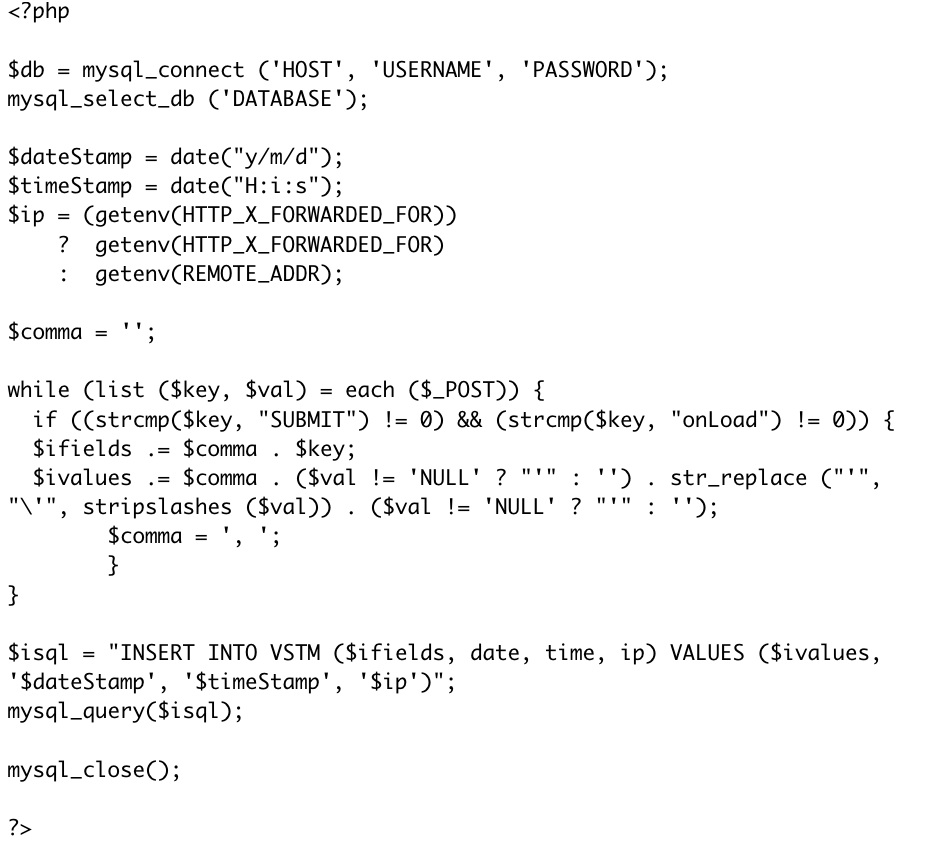
Let’s take a look a the PHP file we called in our code above (I find it easiest to edit this in a simple text editor):


It looks scary, but it turns out that you can ignore most of this code. The PHP file first creates a string of MySQL code. The next line sends runs the mysql_query function with the string as the argument. Then MySQL is closed and the file ends.

There are only three lines of code you need to modify. The top two lines will need to be modified so that the host name, username and password are all correct. This will probably be the same for every experiment, unless different experiments use different databases. You also need to change the $isql = “INSERT INTO ….” line. This tells MySQL which table to insert the data into (see the MySQL chapter). This will probably be different for each experiment.

For this tutorial, you might replace “TABLENAME” with “VSTM”, so that the code reads:

$isql = "INSERT INTO VSTM ($ifields, date, time, ip) VALUES ($ivalues, '$dateStamp', '$timeStamp', '$ip')";

For those who want more detail, read on below:

Web Experiment Tutorial: Chapter 5, HTML for Flash Experiments

Several years ago, I wrote a tutorial for my previous lab on how to create Web-based experiments in Flash. Over the next number of months, I'll be posting that tutorial chapter by chapter.

Now you have an experiment, but you can’t retrieve the data from it. This limits the usefulness of the experiment. In this chapter, we will finish implementing the experiment. This includes both recording the data and also presenting the experiment online.

To do this, you will need to learn a small amount of HTML, MySQL and PHP.

1. What is HTML?

HTML is the bread and butter language of the Web. It is not a programming language in the same sense that C++ or BASIC are. It’s better described as a “mark-up” language. That is, an HTML file is essentially a text document with codes interspersed, telling the web browser how to display that text.

An HTML file can have more than just HTML in it. Frequently, it also contains JavaScript, which are quite different from HTML. We will use both.

An indepth discussion of HTML and JavaScript is outside the scope of this manual. Our purpose here is to learn just enough to allow you to display your experiment to participants.

2. Create an experiment homepage.

I use Dreamweaver to create web pages. Dreamweaver allows a great deal of flexibility in formatting. Having a pretty webpage is not strictly necessary, but the better your webpage looks, the more participants will take it seriously. Think about whether you would rather give personal information to a website that looks like it was created by an orangutan or one that looks like it was created by a highly sophisticated team of programmers.

Download and expand VSTM.zip. Open index.html. Index.html is the experiment’s homepage. It has some nice features you could use, such as a scroll bar for the center frame.

You should edit this page as appropriate. If you have a standard formatting for your website, you can adjust to fit that. One thing to notice is that the name of the laboratory is prominently displayed. This is because people may surf directly to this page. Ideally, you would also have links to the rest of your lab website (that’s what I use the top bar of this page for).

Also, notice that there is very little text. It's often a good idea to have as little text as possible, but at the same time, be as informative as possible. Notice also that the link to the experiment (VSTM) is highlighted so that participants don’t have to hunt around for it.

3. The consent form.

There is a link in the center of the page. The text is “Try the VSTM experiment by clicking here.” This link opens “consent.html”. Consent.html is a fairly simple page and as actually created in a text editor. The participant sees a consent form. This particular consent form was required by the Harvard IRB.

If you want your experiment to pop up in a new window centered in computer screen, you can do this with some JavaScript, which you can find by looking through consent.html:


This sets up a subroutine called “NewWindow” that does two things. First, it will open test_in_progress.html. It will also open another window and center it in the middle of the subject’s screen. This other window will contain the experiment itself (to be discussed in another chapter). Generally in vision experiments, you would like the experimental window to be centered.

This subroutine is called by the link itself. Look towards the bottom of the file:


This code both presents the link to the participant and also causes the new window to appear in the middle of the screen when "Yes, I Agree" is clicked. Notice that the size of the window is set to 650x500. You'll want that to match both the size of the Flash file you've created (slightly larger is OK) and also the dimensions specified in the .php file which will be discussed in the next chapter.

3. The other HTML files.

There are two other HTML files included: test_in_progress.html and done.html. These two are themselves called by PHP files. test_in_progress.html is called by test_popup.php (linked to by Consent.html). It displays below the experimental window itself while the experiment is running. It contains some text telling participants what to do if the experimental window doesn’t show up or if they should leave the experiment early. Done.html is called by the experiment when the subject exits the experiment.

Both are fairly self-explanatory.

The Video Test: Test Your Visual Memory

There's a new experiment at GamesWithWords.org. This one focuses on the relationship between short-term and long-term visual memory. You will watch a video followed by a memory test for the video. We'll compare those results to those of a short-term memory test.

This is one of my personal favorite experiments, mainly because the video is a clip from one of my all-time favorite short films (I was very lucky to get permission from the creators to use it).

It's also one of my longest-running projects. Some of you may remember this experiment, as I've run it before. In fact, there have been something like 12 versions of this experiment run. The results have been interesting, if confusing, but with each experiment our methods get more refined. I think this experiment is the best of the bunch. It will also be the last (it's time to move on to other projects), which means I'll be able to post results for the entire project sometime this summer.

(Some people may wonder why GamesWithWords.org is running a visual memory experiment. Much of my research focuses on the relationship between language and other components of the mind. Occasionally this line of work necessitates and excursion beyond language to those other components of the  mind.)

Empirical English

I'd like to point readers to a brief article in the New York Times today discussing new applications of psychological research methods to the study of literature. While it sounds like some of it is based on using neuroscientific methods to answer what are actually behavioral questions, the application of empirical methods is always a good thing. Any statement that makes an empirical claim about the world should be testable in some fashion, and the fact that more and more fields are actually testing the claims they make is progress.

Questions about the tutorial?

Hi folks -- anyone who is trying to use the Web Experiment Tutorial, please do write in (gameswithwords at gmail) or comment with questions. This tutorial was written for Flash MX, and though I actually still run programs that were based in MX and they work fine, there may be adjustments necessary for people using the latest versions of Flash. I'd be interested in hearing if you run into any such difficulties.

Web Experiment Tutorial: Chapter 4, Flash: Finishing Touches


Several years ago, I wrote a tutorial for my previous lab on how to create Web-based experiments in Flash. Over the next number of months, I'll be posting that tutorial chapter by chapter.

1. Getting Reaction Time.

For some experiments, you may wish to record reaction time. Reaction time will not be very accurate in a Web-based experiment. A priming experiment, for instance, would probably not be ideal. However, for larger reaction time effects, this methodology should be sufficient.

You could get a reaction time mouse click in the following manner:

In the “probe” frame, add the following code right after the code that displays the probe:

start_time =new Date().getTime();

Add this code to the “same” and “different” buttons, just before the gotoAndPlay statement:

_root.RT = new Date().getTime() - _root.start_time;

The variable “RT” will now contains the number of milliseconds that passed between the probe display and the mouse release. We could change it to the onset of the mouse click by changing the subroutines in the “same” and “different” buttons to on (click).

However, responding with the mouse is slow, and you would probably prefer using key presses. This is more complicated. Do not try to understand the following method. It frankly makes no sense. Just try to learn how to use it.

First, make an empty text box containing a single space. Convert it to a movie clip named “keyTrap”.

Select “keyTrap” and attach the following code:

onClipEvent(keyDown) {
ResponseKey=Key.getCode();
responseTime=new Date().getTime();
_root.RT=responseTime - _root.start_time;
switch (ResponseKey) {
case 83:
//S
if (_root.match==1){
_root.correct = 1;
}else{
_root.correct = 0;
}
break;
case 68:
//D
if (_root.match==1){
_root.correct = 0;
}else{
_root.correct = 1;
}
break;
}
_root.gotoAndPlay("feedback");
}

The onClipEvent(keyDown) subroutine executes when any key is pressed.

Key.getCode retrieves the ASCII key code for the key that was pressed. The table for a standard keyboard is reproduced below.

The only other novel piece of code here is the switch statement. Switch statements in Flash have the following form:

Switch (VARIABLE) {
case VALUE-OF-VARIABLE:
CODE
break;
Case ANOTHER-VALUE
CODE
break;
}

Without the “break” command, Flash will execute the next line. Consider the following code:

Switch (number){
case 1:
trace(‘1’);
case 2:
trace(‘2’);
case 3
trace(‘3’);
}

This code will count to 3 starting with the value of “number”. If “number” = 1, then it will count: 1, 2, 3. If number=3, it will only count: 3.

(the “trace” command outputs to the output window. This can be seen when running a .fla program within Flash. The code does nothing when running off a website.)

You should also delete the “same” and “different” buttons. Now, you can respond by pressing “s” for “same” and “d” for “different”. Your program should now look like this.


ASCII codes for a standard keyboard:
A 65

B 66

C 67

D 68

E 69

F 70

G 71

H 72

I 73

J 74

K 75

L 76

M 77

N 78

O 79

P 80

Q 81

R 82

S 83

T 84

U 85

V 86

W 87

X 88

Y 89

Z 90

0 48

1 49

2 50

3 51

4 52

5 53

6 54

7 55

8 56

9 57


2. The Loader Bar

Ideally, you would like your program to load completely before it starts executing. If it is a large program, this may mean that participants have to wait. It’s a good idea to let them know how long they will be waiting.

This is where a loader bar comes in. I actually don’t understand how loader bars work, so I suggest simply copying the first frame of Part4.fla, including all attached code. This should work. Note that when it finishes loading, it goes to and plays a frame called “Initialize.” You will want to adjust this accordingly.

There are many resources online that discuss loader bars. However, most of them involve loading one Flash file inside of another one.

3. Arrays

As in other programming languages, you will frequently want to make use of arrays. One purpose for arrays is determining the order of all the stimuli before beginning the experiment.

Now that you’ve added a loader bar, your second frame (the one called “Initialize” in Part4.fla) should contain the code

total_trials = 5;
current_trial = 1;

Change it to the following code:

total_trials = 5;
current_trial = 0;
var Stimuli = new Array();
for (i=0; i < total_trials+1; i++){
Stimuli[i]=random(3)+1;
}
var Match = new Array();
Match[0] = 0;
Match[1] = 1;
Match[2] = 0;
Match[3] = 1;
Match[4] = 0;
Match[5] = 1;

The first change is that current_trial is set to 0. This is because the first cell in a Flash array is labeled “0”.

Next, we create an array called “Stimuli”. Using a for loop, we randomly set each cell of “Stimuli” to a number between 1 and 3. There are 6 cells, one for each trial. This way, on trial N, the program cal look to the value of Stimuli[N] in order to choose the stimulus.

You will also want to change the first line of the “stim” frame from

stimulus=random(3)+1;

to

stimulus=Stimuli[current_trial];

Notice that we named the array “Stimuli”. If we named is “Stimulus,” it would then share the same name as the one we assigned to the stimulus movie clip. This causes some of the other code associated with the movie clip to malfunction. So that is something to avoid.

This new code so far does not change how the experiment runs, other than that all the stimuli are chosen in the beginning. This is probably not very useful, but serves as an example.

Next, we create an array called “Match”. We assign half the cells the value 0 and half the value 1. Change the code on the “Probe” frame to the following:

stop();
match=Match[current_trial];
if (match==1){
probe=stimulus;
}else{
ok=1;
while (ok==1){
probe=random(3)+1;
if (probe==stimulus){
}else{
break;
}
}
}
_root.attachMovie("Stim"+probe,"Probe",2);
setProperty(eval("Probe"), _x, 275);
setProperty(eval("Probe"), _y, 200);
start_time =new Date().getTime();

What has changed? Before, we randomly chose a probe, and then set match to 0 if the probe and stimulus did not match and to 1 if they did. Now, we look to the appropriate cell of the Match array. If, on trial N, Match[N] == 1, we set the probe equal to the stimulus. Otherwise, they differ.

The only new code concept is the “while” loop. While loops execute all the code within the {} brackets as while the code within the () parentheses remains true OR until the program executes a BREAK statement. In this case, ok always equals 1, so the while loop will run until it executes the BREAK statement – which can only happen if the probe and stimulus do not match, which is what we want.

The purpose of this code is to make sure that 50% of trials are “Match” trials and 50% are “No Match” trials. However, the pattern is fairly simple, and subjects may catch on quickly. We would like to randomize the order of the trials.

Add the following code to the bottom of the Initialize frame:

var Trials = new Array();
for (i=0; i < total_trials+1; i++){
Trials=i;
}
shuffle(Trials);

function shuffle(a) {
var i = a.length;
while (i) {
var p = random(i);
var t = a[--i];
a[i] = a[p];
a[p] = t;
}
}

First, we create an array called “Trials” and set it to the values 0 through 5. Then we execute a function called “shuffle”, with “Trials” as the argument.

Finally, we define the function “shuffle”. Although this seems out of order, it will work fine. You should be able to parse the code on your own, but basically it uses a simple shuffling algorithm to randomize the order of the cells in Trials. Instead of Trials equaling [0 1 2 3 4 5] it may now equal [3 0 4 5 1 2] or any other random permutation of those values.

How does this help? We need to change one other things. Change the second line of the “probe” frame to:

match=Match[Trials[current_trial]];

I will let you convince yourself that the program will still use each value of “Match” exactly once during the experiment, but rather than running through each cell of Match in order, the order is now randomized.

For consistency, you may wish to make a similar change to the first line of the “stim” frame.

4. Surveys/Demographics

You may want to ask your subjects a few questions. This could in theory be done by using buttons as in the examples above, but it’s less than ideal.

There are several more ways of collecting information from participants. Three include radio buttons, combo boxes and input boxes.

Radio buttons are a group of linked buttons, only one of which can be selected at any one time. Look at the “Demographics” frame of Part4.fla. The first and third questions are both examples of radio buttons.

To set up rradio buttons, first drag a radio button from the Flash components window (or from your file’s library, if it already contains radio buttons). Make as many copies as you need.

Select one of the radio buttons. In the properties inspector, choose “parameters”. There are several you will want to change. “Data” contains the value of that button when selected. In Part4, the “Female” button’s data is “female”, while the “Male” button’s data is “male”. This will be more clear shortly. “groupName” is the name of the group. Radio buttons that share the same groupName are automatically part of the same group. One one can be selected at a time. “Label” is the text that is displayed to the subject. Try changing this and its function will be clear.

A combo box is slightly more complicated to set up. Again, drag a combo box onto your stage. In the properties inspector, change it’s name to age_box. Now, in the code attached to this frame, add the following:

ageData = new Array(101);
ageData[0]="Select";
for (i=1; i<101; i++) {
ageData[i]=i;
}
age_box.setDataProvider(ageData);

This creates an array with the values [‘Select’ 1 2 3 4 … 99 100]. This array is then assigned as the values of the combo box. If you test this frame, you will see that the default for the combo box is the first value (“Select”), and by scrolling you can choose any number from 1 to 100.

The third question is again made of two radio buttons, which have the values of “yes” and “no”. There is one interesting technique used here. The question “Do you have normal or corrected to normal vision?” is actually complicated, and not everybody understands it. However, including the entire explanation involves adding a lot of text, decreasing the chances that the subjects will actually read it.

So I added an invisible button underneath the text “(Click for explanation)”. The text is a dynamic text box called “explain”. The button contains the following code:

on (release){
_root.explain = "If your vision is normal when wearing glasses or contacts, answer 'yes'.";
}

Thus, if the participant clicks in the vicinity of the text box (to be accurate, if they click the invisible button), the text box’s text changes to a brief explanation.

Finally, we have an example of an input box. You create an input box the same as a static or dynamic text box, but in the properties inspector, you choose “input text” instead of “static text” or “dynamic text”. You should type “Initials” into the var box in the property inspector in order to name the data contained in this box, just as you would for a dynamic text box.

You can also type in a default value. Since I want 3 initials, I typed in “XXX”.

Finally, you need a way for subjects to submit their responses, and you need a way of recording that information.

I have included a button called “continue1_btn”, labeled “Continue”. Now, let’s look at the full code for this frame:

stop();

ageData = new Array(101);
ageData[0]="Select";
for (i=1; i<101; i++) {
ageData[i]=i;
}
age_box.setDataProvider(ageData);

demoBtn = new Object();

demoBtn.click = function(evt) {
age = age_box.getSelectedItem();
sex = sex_group.getValue();
normal_vision = vision_group.getValue();
initials = Initials;
good_form = 1;
if (sex == undefined) {
good_form = 0;
}
if (age == "Select") {
good_form = 0;
}
if (normal_vision == undefined) {
good_form = 0;
}
if (initials == "XXX"){
good_form = 0;
}
if (good_form == 1) {
gotoAndPlay("Instructions");
}else{
warning="Please finish all questions before continuing.";
}
}

continue1_btn.addEventListener("click", demoBtn);

The first part we have already gone over. Then we define a new object called “demoBtn”. Then we write an event handler to handle the event that the demoBtn is clicked. It first retrieves the data from the page. “age” is set to the value of the age_box. The value is literally whatever the subject selected. If they selected “74”, then the value is “74”. Then, “sex” is set to the value of the sex_group. Recall that using the property inspector, we set the “data” assigned to one radio button to “female” and the other to “male”. Thus, if “Female” is selected, the value of “sex” will be “female”. “normal_vision” is set by a similar process. Finally, “initials” is set to the value of whatever is typed into the input text box named “Initials”.

It’s important to make sure that the participants filled everything out. We make a dummy variable called “good_form” and set it to 1. Then we check each variable in turn. If it is undefined (in the case of radio buttons) or still set to its default values (in the case of the input text box or the combo box), we set “good_form” to 0.

Finally, if “good_form” = =1, we go on to the next frame. If it does not, we don’t. However, if nothing happens when the subject clicks “continue”, they may not realize it’s because they still have stuff to fill out. They may think the program is broken. So in the case that good_form == 0, we set a dynamic text box to “Please finish all questions before continuing.” That dynamic text box is at the bottom of the screen and is called “warning”. Notice that it must be set as “multiline” in the property inspector; otherwise, not all the text will be visible.


----
The working version of Part4 in .swf form can be found here.

Games with Words in Taiwan

I've been in Taiwan for two weeks, and further posts of the Tutorial will probably wait until I get back next week.

I had an excellent two-day visit to Prof. Su Yi-ching's lab at Tsing Hua University (Qinghua for you pinyin-readers), where I was able to collect an absurd amount of data due to the generosity of Prof. Su and her students (over 110 participants in two written studies, plus three in an eye-tracking study). I also had a great time at Prof. Lee Chia-Ying's very lively lab at Academia Sinica, where I got to observe a kid ERP experiment (something I've never actually seen, though I'm in the process of planning one of my own) and also test several more participants in the eye-tracking study. I also visited Prof. Chueng Hintat at National Taiwan University. I was mildly surprised to discover I actually can discuss my research in Mandarin when necessary, though with most people it was possible to use English (thankfully).

I wasn't at all sure how this trip was going to go when I planned it, as at the time I didn't actually know any psycholinguists in Taiwan. It turns out that there's actually a pretty substantial group of developmental psycholinguists working on interesting problems. Su and Cheung are both in the process of releasing much-needed new child corpora, with Su focusing on (if I remember correctly) optional infinitives (to the extent such can be recognized in a language with no inflectional morphology) and lexical tone, and Cheung focusing on argument structure alternations. Lee's lab is producing some really well-considered studies of character-reading (for instance, looking at how phonetic and semantic radicals are processed). I also heard of several other faculty doing exciting work but whom I didn't have time to visit.

And, of course, I got a lot of data, which is good since Harvard partly funded this trip on the expectation I would run some experiments. The experiments I was running are all similar to the Pronoun Sleuth project -- that is, looking at factors that affect what people think a pronoun means, and trying to replicate some of my findings in English.

Class Notes: Why linguistic judgments are fuzzy

Buried towards the end of a 1991 paper by Fisher, Gleitman & Gleitman is a strikingly useful -- and I think, correct -- observation on the limits of grammaticality studies. In the context of a broader argument that people learn the meanings of verbs partly from the syntactic frames the verbs appear in ("syntactic bootstrapping"), they argue that exactly this "feature" of verb learning makes it sometimes hard to decide if a particular verb is grammatical in a certain context.

Consider the present progressive in English. Classically, the present progressive can only be used for ongoing activities (1-3), not completed activities (4) or states that aren't typically activities (5):

(1) Sarah is eating the carrot.
(2) Sarah is running to the store.
(3) Sarah is looking at the moon.
(4) *Sarah is breaking the vase.
(5) *Sarah is seeing the moon.

However, a lot of people's judgments about (4) and (5) are iffy. They don't sound nearly so ungrammatical as (6).

(6) The boys carrot eats.

The idea is that people are influenced by the syntactic frame the verb appears in and reinterpret the verb. That is, if you think of "breaking" as something that happens in an instant, it isn't an activity and you can't say (4). However, if you imagine a long, drawn-out process in which Sarah methodically destroys a vase, "break" is now an activity, and (4) is fine. Similarly, "see" usually describes an end-state of some process, but you can re-imagine it as an activity (maybe Sarah observes the moon regularly as part of her profession).

I run into this constantly in my study of verbs of psychological state. Influenced by a paper by Liina Pylkkanen's 1991 "On stativity and causation," I've been pursuing the argument that certain psych verbs can't appear in certain syntactic frames. For instance, "love" and "hate" can't appear in the present progressive. In a sense, this seems right; (7) and (8) are somewhat more odd than (9) and (10).

(7) *John is loving the Red Sox.
(8) *John is hating the Yankees.
(9) John is frightening the squirrels.
(10) John is angering the chickens.

Unfortunately, one can usually find a way of reinterpreting "love" and "hate" such that they are activities  and then (7) and (8) don't sound so bad. This has made testing the hypothesis difficult. In addition, English appears to be changing to allow more psych verbs in the present progressive (darn you, McDonalds).


-------
Fisher, C., Gleitman, L. R., & Gleitman, H. (1991). On the semantic content of subcategorization frames. Cognitive Psychology, 23, 331-392.

Class Notes: This field confuses the hell out of me. I want to start from scratch.

I have now read 44 papers in the course of this semester's Language Acquisition seminar. The only firm conclusion I have come to is that language is so complicated that nobody could ever possibly learn one.


---
(The title of this post comes from the caption of a doodle of a mid-century Harvard psychologist, now enshrined in a display case on the 9th floor of William James Hall. Based on the time period, I think the doodler was either George Miller or Roger Brown, but I can't recall for sure.)